
Funimate Video Editor & Maker
Pixery Bilgi TeknolojileriVideo Players & Editors
4.3153.20K Reviews
- Version
- 14.0.9
- Installs
- 50.00M
- Age Rating
- Teen
Screenshots
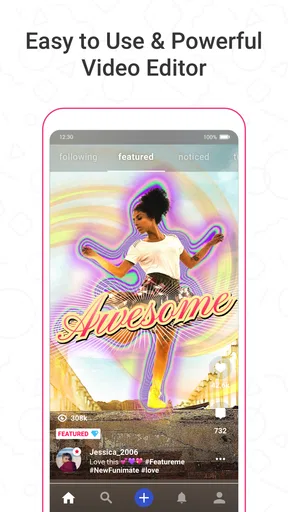

Our Review of Funimate Video Editor & Maker
 Analysis by Appyee
I have always liked video editors that let me move quickly from an idea to something shareable, and Funimate Video Editor & Maker fits that particular mood. It is a mobile video editing app from Pixery Bilgi Teknolojileri, aimed at people who want eye-catching edits without opening a full desktop-style timeline. After spending time with it, I see it as a lively middle ground: more expressive than a basic trimming tool, but less demanding than a professional editor built around detailed manual control.
The app is free to download and sits in the video players and editors category. Its audience is broad, although the Teen content rating is worth keeping in mind for families choosing creative tools for younger users. Funimate has been available since August 19, 2016, and its current version is 14.0.9. That long presence helps explain why it feels designed around quick social videos rather than around traditional film editing.
How Funimate feels in its current form
The first thing I notice is the app’s emphasis on visual energy. Its editing approach is built for short clips where movement, overlays, stickers, transitions, and animated details matter as much as the original footage. I can start with a phone recording, cut away the slow parts, add a visual layer, and shape the result into something that feels deliberately edited rather than simply uploaded.
That makes it particularly appealing for music edits, dance clips, gaming highlights, outfit videos, sports moments, and short personal montages. I would not choose it first for a long interview, a lecture, or a carefully structured travel documentary. Those projects usually benefit from a larger workspace, precise audio handling, and a calmer editing process. Funimate’s strength is immediacy: it encourages experimentation and makes decorative editing feel approachable.
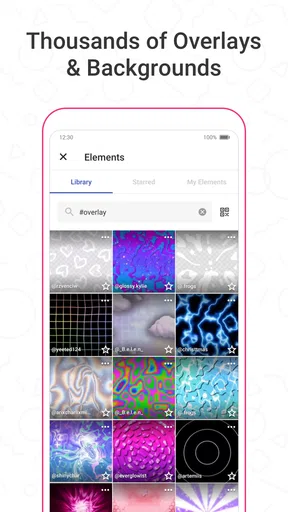
The app’s store summary focuses on pro-style edits, stickers, overlays, custom animations, and similar creative tools. In practice, those elements work best when I treat them as accents rather than covering every second of a clip with effects. A short animation placed at the moment of a beat or a sticker used to underline a reaction can add personality. Several competing effects layered without a clear reason can make the result look busy very quickly.
My main recommendation is to edit for one clear visual idea at a time. If the concept is a fast transformation, let the transition and timing carry the video. If the concept is a funny reaction, use text, stickers, or a small overlay to direct attention. Funimate gives me enough creative material to overdo things, so restraint becomes part of getting good results.
What has changed over the product’s life
Funimate’s history matters because it is not a brand-new experiment trying to discover what mobile creators need. Released on August 19, 2016, it has had years to develop around the habits of people who edit directly on a phone. The current version, 14.0.9, represents the app as it exists now, while the older release date shows the broader product evolution behind that experience.
I would describe that evolution as a shift from simple mobile creativity toward a more feature-rich editing playground. The app’s identity is not based only on cutting clips together. It is built around making ordinary footage feel more animated through layers, decorative elements, and motion. That direction is useful for users who want a recognizable style without learning a complex desktop application.
At the same time, a mature app can feel more crowded than a minimalist editor. New users may see several creative paths before they know which one suits their project. I found it easier to get good results when I began with a finished idea instead of browsing effects first. Choosing the clip, deciding where the visual emphasis belongs, and only then selecting an effect kept the process from turning into random decoration.
The broad adoption figures also put the app in perspective. Funimate has passed 50 million installs, with an average rating of 4.3 from around 1.1 million ratings and roughly 153 thousand written reviews. Those numbers suggest a well-established audience, but they do not mean every editor will love its workflow. A large user base can confirm that the concept works for many people while still leaving room for individual preferences about controls, exports, and editing depth.
A practical workflow for everyday clips
Imagine I record a short birthday moment on my phone. The raw clip includes a few seconds of someone finding the surprise, a shaky movement while I reposition the camera, and the actual reaction. My first step in Funimate would be to remove the hesitation and keep the emotional beat. Only after the timing feels right would I add a small animated detail or overlay.
For this kind of project, I find it helpful to build in layers of importance. The video itself comes first, the timing comes second, and visual decoration comes third. If I start with stickers or effects, I can lose sight of the moment I am trying to preserve. Once the central action is clear, an animated accent can make the clip feel more intentional without hiding the people in it.
For a music-based edit, I would use a similar method but pay closer attention to rhythm. I would choose a small number of strong cuts rather than changing the visual treatment every second. A recurring overlay can provide continuity, while a custom animation can mark the transition into a new section. This is one area where Funimate feels more expressive than the standard editor included with many phones.
Another useful approach is to make a short test version before committing to a complicated edit. I can check whether the opening catches attention, whether text remains readable, and whether the final effect improves the clip or merely adds noise. This saves time on a phone, where repeated adjustments can become tiring. It also helps me avoid the common mistake of building an elaborate sequence around footage that was not strong enough to begin with.
Where the creative tools stand out
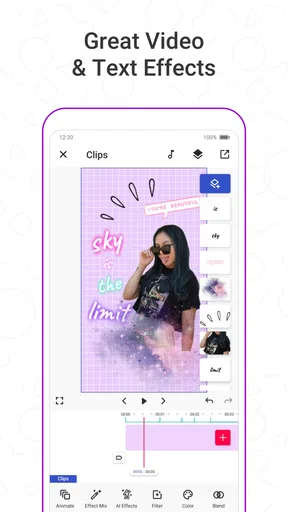
Funimate is strongest when the edit needs a visible personality. Stickers can turn a plain reaction into a playful message. Overlays can create atmosphere or separate one part of a clip from another. Custom animations are especially useful when I want movement that feels chosen rather than automatically applied. These tools give a casual creator more control over the mood without requiring a technical background.
I also like the way this style of editor encourages short-form thinking. Instead of asking me to build a complete production with many tracks and settings, it keeps attention on the parts viewers notice immediately: the opening, the timing of cuts, the visual hook, and the finish. That focus is valuable when I am making something for a quick message or a social post and do not want to spend an evening learning a professional suite.
There is a trade-off, though. Creative effects are not a substitute for precision. If I need exact audio mixing, detailed color correction, careful keyframe management, or a highly controlled multi-track arrangement, I would rather use a more technical editor. Funimate can make a video feel polished in a visual sense, but it is not the same kind of tool as a full production workstation.
That distinction is important for anyone comparing it with the basic editor already on a phone. The built-in editor is usually faster for trimming, rotating, and making a simple correction. Funimate becomes worthwhile when those basics are not enough and I want animated styling, layered visuals, and a more recognizable presentation. Against a professional mobile editor, Funimate is easier to approach but generally less suited to projects where every detail must be manually controlled.
How existing users may experience the current version
Someone who has used Funimate for a while will probably judge the current version less by its basic editing purpose and more by how comfortably it supports a personal workflow. The important question is not simply whether the app can add effects. It is whether I can find the right tool quickly, preview changes without confusion, and finish an edit without feeling that the interface is fighting my idea.
For returning users, the biggest benefit of a mature creative app is familiarity. Once I understand where the main editing actions live, I can focus on timing and style instead of relearning the entire process. The current version number signals an established product rather than an early prototype, and its continued presence makes it a reasonable choice for people who want to keep creating in the same general environment.
New users should expect a short adjustment period. The app is approachable compared with desktop software, but “easy” does not mean every result appears automatically. Good edits still depend on selecting suitable footage, keeping text visible, and avoiding effects that compete with the subject. I would set aside a few minutes to make a private test clip before working on something important.
One practical point is the pricing model. Funimate is free, but it includes in-app purchases ranging from $1.49 to $69.99 per item. That means I can try the core experience without paying upfront, while some optional purchases may become relevant if I want to expand what is available. I would recommend checking the purchase screen carefully before confirming anything, especially if a child uses the device or if the app is being tested for a shared family account.
The free starting point is useful because this type of app is highly personal. Some people will immediately enjoy building animated edits, while others will discover that they prefer a quieter editor. Being able to explore before spending money reduces that risk. My advice is to decide first whether the workflow itself suits you, rather than assuming that buying more creative options will solve a problem caused by unsuitable footage or unclear timing.
Limitations that matter before choosing it
The first limitation is focus. Funimate is designed around expressive short-form editing, so users seeking a neutral, production-oriented workspace may find it too playful. The same visual energy that makes a dance clip engaging can feel unnecessary in a business presentation or a family archive. If your normal projects are long, information-heavy, or dependent on exact audio edits, another app may save you frustration.
The second limitation is the temptation to confuse available effects with a finished style. A large collection of visual possibilities can make beginners add too much. I have found that the best results usually come from choosing one dominant treatment and supporting it with smaller details. This is less a criticism of the app than a consequence of giving creators many ways to decorate a clip.
The third is that phone editing has natural boundaries. A touchscreen is convenient, but it is not as comfortable as a large monitor when I need to inspect many layers or make repeated fine adjustments. Funimate makes mobile creation practical, yet the trade-off remains: speed and portability come at the expense of workspace and granular control.
I would also think carefully about the age rating. The app is marked Teen, so it should not automatically be treated as a child-focused creative toy. Parents may want to review how it is used, especially when a young person is creating or sharing videos. The rating does not change the editing experience, but it is relevant when deciding whether the app belongs on a supervised device.
Who should use it and who should skip it
I would recommend Funimate to someone who wants to turn phone footage into energetic, stylized clips without committing to a professional editing course. It is a strong match for creators who enjoy experimenting with stickers, overlays, animated movement, and quick visual changes. It also suits people who make short videos regularly and want more personality than the default gallery editor provides.
It is less suitable for a user who wants the cleanest possible trimming tool. If all I need is to shorten a recording and send it privately, the phone’s built-in editor may be quicker. I would also steer documentary makers, serious vlog editors, and anyone working with long-form material toward a tool with a larger timeline and deeper audio controls.
Compared with a simple social-media editor, Funimate offers a more distinct creative identity. Compared with a professional mobile editor, it feels faster to approach and more focused on visual play, but it does not replace the need for detailed production software in demanding projects. That middle position is the reason I can recommend it confidently to the right person while still saying that it is not universal.
What I would watch as the app continues
For future updates, I would pay attention to how Pixery Bilgi Teknolojileri balances creative variety with ease of use. More tools are only helpful when I can understand them and apply them without slowing down a short edit. The most valuable direction would be continued refinement of the workflow: clear controls, predictable previews, and a smooth path from raw clip to finished video.
I would also watch whether the app continues to serve both newcomers and experienced Funimate users. Beginners need a welcoming starting point, while regular creators need enough flexibility to develop a recognizable style. Those goals can conflict if the interface becomes crowded, so the product’s evolution will be most successful when new creative possibilities remain easy to discover without taking over the editing process.
For now, Funimate Video Editor & Maker earns its place as a capable free starting point for expressive mobile video. Its 4.3 average and large installed audience reflect broad interest, but my personal judgment is more specific: it is enjoyable when I want movement, color, and personality in a short clip. I would install it for quick music edits, playful messages, and social videos where visual timing matters.
I would skip it for a long interview, a serious documentary, or any project that depends on a highly detailed professional timeline. For everyone else, the best way to approach it is to begin small, keep the original footage visible, and add effects with a purpose. When the edit has a clear idea behind it, Funimate’s energetic tools feel genuinely useful rather than merely decorative.
Verdict
Strengths of Funimate Video Editor & Maker
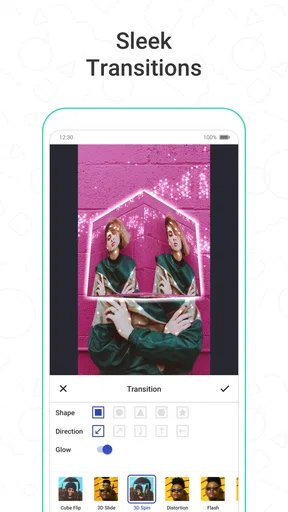
- Large library of effects, transitions, stickers, and music for creative edits.
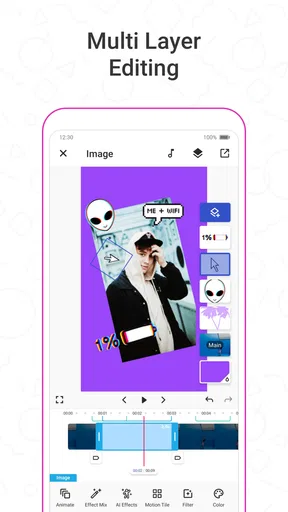
- Timeline editing makes it easy to combine clips and adjust their timing.
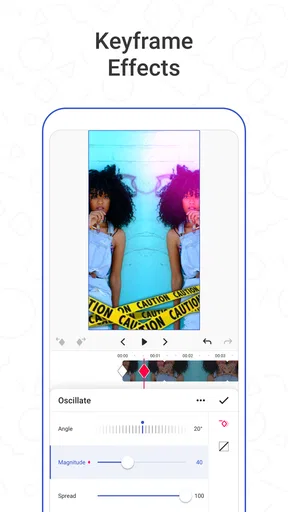
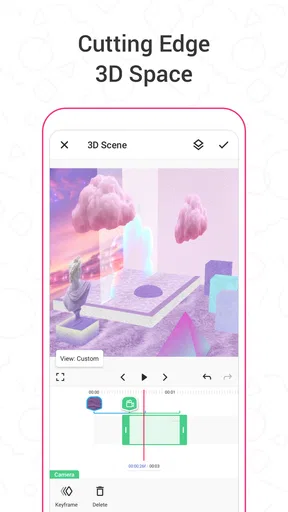
- Supports keyframe-style animations for more precise motion effects.
- Social features let users share creations and discover edits from others.
- Regular challenges and templates can help inspire new video ideas.
Limitations of Funimate Video Editor & Maker
- Many premium effects and tools require a paid subscription.
- The free version may add a watermark to exported videos.
- Advanced editing options can feel limited compared with professional editors.
- Heavy effects and high-resolution projects may drain battery quickly.
- The social feed and sharing features may not suit users seeking a private editor.
Other Releases by Pixery Bilgi Teknolojileri
View All
CloneAI AI Video Generator
Photography2.8

Zurna: AI Song & Music Maker
Music & Audio4.4

Mythic Survivors
Action4.7

Impresso - Video & Logo Maker
Video Players & Editors4.5
Similar Picks in This Category
View All
Google TV
Google LLC3.9

iTunes
Apple4.7

YouTube
Google LLC3.8

MX Player
Amazon Mobile LLC4.2

CapCut - Video Editor
Bytedance Pte. Ltd.3.5

PLAYit-All in One Video Player
PLAYIT TECHNOLOGY PTE. LTD.4.5
Frequently Asked Questions
What is Funimate Video Editor & Maker used for?
Funimate Video Editor & Maker is a mobile video-editing app designed for creating short, creative clips for social media. After exploring its tools, I found options for trimming and joining videos, adding music, text, stickers, transitions, filters, effects, and animated elements. It is especially suited to TikTok-style edits, music videos, fan edits, and visually energetic content rather than advanced professional filmmaking.
Is Funimate Video Editor & Maker free to download and use?
Funimate can generally be downloaded and used without an upfront payment, but the free experience may include advertisements, limitations, or branded exports depending on the feature and current app version. Some effects, editing resources, and other tools may require a subscription or in-app purchase. Before subscribing, check the pricing, trial terms, renewal conditions, and cancellation options shown in your app store.
Does Funimate add a watermark to exported videos?
The presence of a Funimate watermark can depend on the export settings, account plan, and the version of the application available in your region. Free users may encounter branding or restrictions when saving certain projects, while paid features can offer additional export benefits. It is worth creating a short test project first so you can confirm the final video appearance before editing a longer clip.
Is Funimate suitable for beginners?
Funimate is fairly approachable for beginners because many creative effects and templates can be applied without advanced editing knowledge. The interface focuses on quick, visual results, making it easy to experiment with music, transitions, text, and animated effects. However, the large number of tools may feel confusing at first, and achieving precise timing can take practice, particularly when synchronizing edits with a song.
Can Funimate be used safely with personal videos and music?
You can edit personal videos in Funimate, but you should review the app’s permissions and privacy policy before importing sensitive material. Avoid granting unnecessary access and be careful when sharing projects publicly. Music and third-party clips may also be protected by copyright, so having a file on your phone does not automatically give you permission to publish it. Use licensed or platform-approved audio whenever possible.
